

Peekapiles




- Rating:
- 6 (4 votes)
- Engine:
- HTML5 / JavaScript
- Platform:
- Browser (Desktop and Mobile)
- Orientation:
- Landscape and Portrait
- Release date:
- November 26, 2026
- Last update:
- November 26, 2026
Peekapiles Game Description
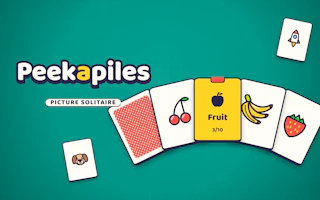
Peekapiles is a calm picture solitaire for the whole family. Pictures are dealt into columns and a pile like classic solitaire, and you sort them into categories such as fruit, sea life, toys or space. Put a category card on an empty spot, then add the pictures that belong to it. No reading needed: the cards show only pictures. Frozen cards, coin cards, a sticker album, card backs and tables to collect. 200 solver-checked levels in 8 languages.
How to play Peekapiles?
Desktop
Click a card to pick it up, then click its category at the top, an empty spot or a column. You can also drag cards.
Space = draw, U = undo, H = hint, R = restart, M = menu
Mobile
Tap a card, then tap where it goes, or drag it. Hold a finger on a card to see it big with its name.
Put a category card on an empty spot first, then sort its pictures onto it. In a column a card goes only onto the same kind. Every move counts.
Platform
Browser Desktop , Mobile and Tablet
Release date
November 26, 2026
Last update
November 26, 2026
FAQs
What does the glowing card mean?
On the first levels the game lights up a good move: the yellow card is the one to pick up, the green place is where it goes.
What if no move is left?
Tap the pile to turn over a card. If the table can't be finished any more, the game tells you, and you can undo or try again.