

Minesweeper 3D No Guess - Up to 26 Neighbours



- Rating:
- 6 (4 votes)
- Engine:
- HTML5 / JavaScript
- Platform:
- Browser (Desktop and Mobile)
- Orientation:
- Landscape and Portrait
- Release date:
- November 26, 2026
- Last update:
- November 26, 2026
Minesweeper 3D No Guess - Up to 26 Neighbours Game Description
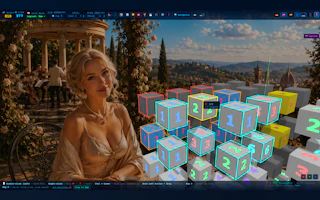
Minesweeper in a real 3D cube! Each cell touches up to 26 neighbors, so you read the numbers in every direction. No-Guess boards: every puzzle is solvable by pure logic. Includes a guided tutorial, a pattern library and an autopilot that explains each move.
Controls (full Control Table at beginning of "instructions"):
· double-click (double-tap) = open
· right-click (long press) = flag
· drag = rotate · mouse wheel = spread cubes
· hold Ctrl/Cmd + hover = show neighbors
· C = reset view
How to play Minesweeper 3D No Guess - Up to 26 Neighbours?
Controls (full Control Table at beginning of "instructions"):
· double-click (double-tap) = open
· right-click (long press) = flag
· drag = rotate
· mouse wheel = spread cubes
· hold Ctrl/Cmd + hover = show neighbors
· C = reset view
For Level >= L3 you can divide the Gaming Board in "Sub-regions) (button upper right) to have a better overview.
Advanced players can try the icosahedron geometry, build a custom geometry in the geometry editor, or compete in the global leaderboard.
Platform
Browser Desktop , Mobile and Tablet
Release date
November 26, 2026
Last update
November 26, 2026
FAQs
Do I have to watch all 26 neighbors at once?
No. Most numbers only need the few cubes around them. Hold Ctrl/Cmd and hover over a number to see just its neighbors, then compare two numbers.
Do I have to keep rotating to see every cube?
You only need the cubes you are comparing. Some may stay hidden, that is fine. Rotate a little or press C to reset the view.