

Hang in Balance



- Rating:
- 6 (4 votes)
- Engine:
- HTML5 / JavaScript
- Platform:
- Browser (Desktop and Mobile)
- Orientation:
- Landscape and Portrait
- Release date:
- October 27, 2026
- Last update:
- October 27, 2026
Hang in Balance Game Description
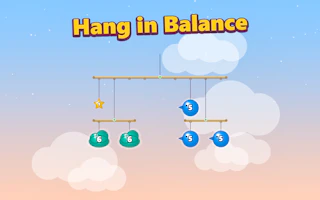
Hang every shape on the mobile so all the arms stay perfectly level. Each piece has its own weight, so moving one changes everything above it. 30 calm puzzles that start easy and get really tricky, with a hint button when you are stuck.
Feel the Balance
Every arm tips toward the heavier side. Hang a heavy shape close to the string and a light one far away, and the arm settles level. When every arm is straight at once, the whole mobile balances and the level is solved.
30 Handmade Puzzles
Each level has its own set of shapes and hooks. The first ones teach the idea, then the mobiles get taller with arms hanging from arms, so one move can tilt everything below it.
How to play Hang in Balance?
Desktop
Drag a shape with the mouse = Hang it on a hook
Z / Backspace = Undo
R = Restart level
H = Hint
Esc = Pause
Mobile
Drag a shape with your finger = Hang it on a hook
Tap the buttons = Undo, Restart, Hint
Hint
The number on each shape is its weight. Heavy shapes near the middle, light shapes far out keep an arm level.
Platform
Browser Desktop , Mobile and Tablet
Release date
October 27, 2026
Last update
October 27, 2026
FAQs
What do the numbers on the shapes mean?
That is the weight. Heavier shapes pull their side of the arm down more.
Can I move a shape after placing it?
Yes. Just drag it again to another hook, or press Undo.