

Line Defense Draw to Save


- Rating:
- 6 (4 votes)
- Engine:
- HTML5 / JavaScript
- Platform:
- Browser (Desktop and Mobile)
- Orientation:
- Landscape and Portrait
- Release date:
- October 23, 2026
- Last update:
- October 23, 2026
Line Defense Draw to Save Game Description
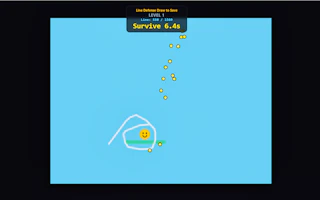
Line Defense Draw to Save is a fun and challenging line defense game. In this game, your main goal is to protect your cute Smiley Ball character from various dangers. You have to draw lines, circles, or any shapes using your finger or mouse on the screen to create a protective barrier. Keep in mind that whatever shape you draw should not be drawn too close or stuck to the Smiley Ball—if the line is too close or touching the ball, your character can get destroyed due to the impact of the collision.
How to play Line Defense Draw to Save?
PC / Desktop (Mouse):
Draw Defense Lines: Click and hold the Left Mouse Button while moving the cursor to draw custom lines or shapes around the Smiley Ball.
Release: Release the left mouse button to lock the drawn shape in place.
Mobile / Touch Devices:
Draw Defense Lines: Touch the screen and drag your finger to draw any shape or circle around the Smiley Ball to create a protective barrier.
Release: Lift your finger off the screen to complete the drawing and start the physics simulation.
Platform
Browser Desktop , Mobile and Tablet
Release date
October 23, 2026
Last update
October 23, 2026